CCTV Cameras Explained: Types, Ratings and How a System Works
A CCTV system is cameras, cables, a recorder and a way to watch. This guide explains each part in plain words: the camera shapes, IP versus analogue HD, outdoor ratings, night vision, PoE power and recorders, so you can understand a quotation before you pay for one.
The parts of a CCTV system and how video travels from camera to phone
How bullet, dome, turret and PTZ cameras differ
The difference between IP cameras with an NVR and analogue HD cameras with a DVR
What IP66, IP67 and IK10 mean on a datasheet
How resolution, lens, night vision and WDR affect the picture
What to ask an installer before you buy
Applies to
IP cameras (bullet, dome, turret, PTZ)
Analogue HD cameras (HD-TVI, HD-CVI, AHD)
NVR, DVR or hybrid recorder
PoE switch
Surveillance hard drive
Router and UPS
Tools Required
No tools needed.
Before you start
A list of the places you want to cover and what each camera must see
Important
Do not open recorders or camera power supplies connected to mains power.
Never put cameras in private places such as toilets or changing rooms.
Never open router ports to the recorder for remote viewing.
Step-by-Step Guide
The parts of a CCTV system, one at a time
1 / 9 steps
Step 1
The bullet camera
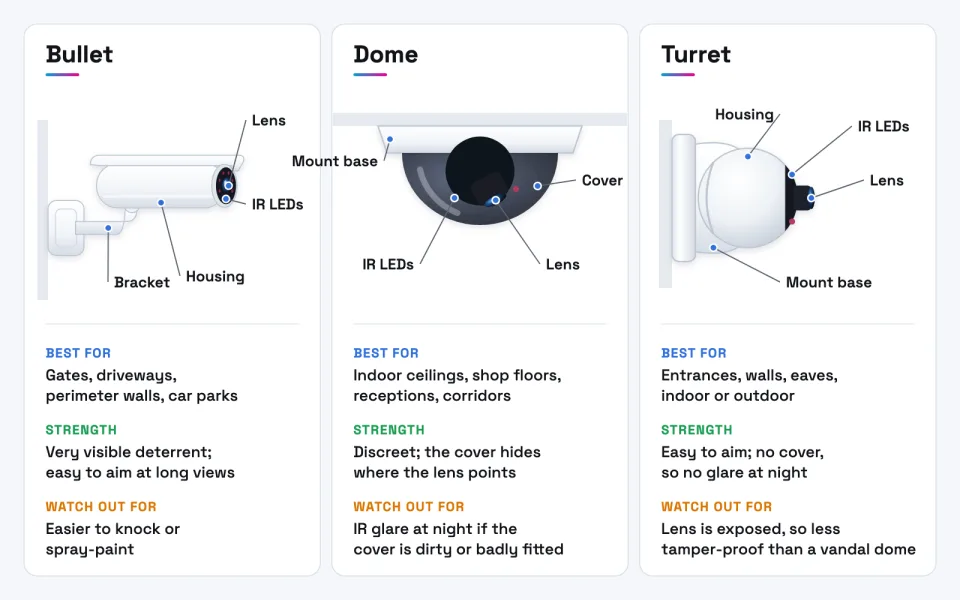
A tube-shaped camera on an arm bracket. The long housing has room for a bigger lens, so bullets suit gates, driveways and long walls.
Expected result: You can recognise a bullet camera and know it is the most visible deterrent.
The lens sits under a clear or tinted cover fixed flat to a ceiling or wall. People cannot easily see where it points.
Expected result: You know why domes suit shops, receptions and corridors.
A ball-shaped camera in a round base, with no cover in front of the lens. It is easy to aim and avoids dome glare at night.
Expected result: You know the turret is the all-rounder for walls, eaves and entrances.
Infrared LEDs around the lens light the scene with light you cannot see. The camera switches to black and white in the dark.
Expected result: You know the IR range on a datasheet is measured in ideal conditions.
An IP camera takes power and sends video over one network cable using PoE. Each copper run can be up to 100 metres.
Expected result: You know why wired PoE cameras are the reliable choice for businesses.
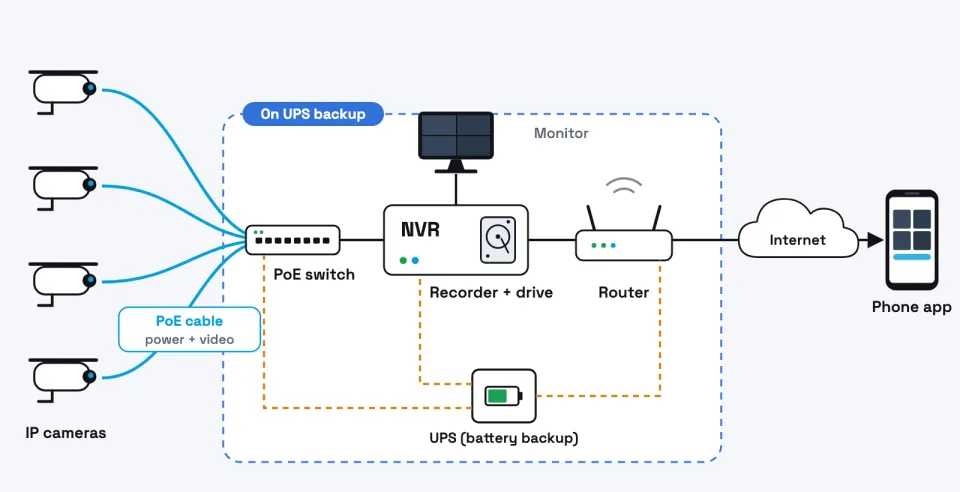
Cameras connect to a PoE switch, the switch to the recorder, and the recorder to the router. The UPS keeps the core running in a power cut.
Expected result: You can follow the path from each camera to your phone.
The NVR writes every camera's video to a surveillance hard drive and overwrites the oldest footage when the drive is full.
Expected result: You know the drive size and the cameras' bitrate decide how many days you keep.
Analogue HD cameras send video over coaxial cable to a DVR. Most need a separate power supply unless they use power over coax.
Expected result: You can tell an analogue HD system from an IP one by its cable and recorder.
Use the manufacturer's app or a VPN with your own account. Do not open router ports to the recorder.
Expected result: You can view live video and playback without exposing the recorder to the internet.
Troubleshooting
Common problems and how to fix them
1 Faces at the entrance are dark silhouettes
Likely cause Bright light behind people and no true WDR, or the camera faces the sun.
Solution Use a camera with true WDR at entrances, re-aim it away from the light, or move it inside the doorway.
2 Night picture is hazy or washed out
Likely cause Infrared reflecting off a dirty dome cover, a nearby wall or eaves.
Solution Clean the cover with a microfibre cloth, check the foam ring around the lens and leave space from nearby surfaces.
3 Faces are too small to recognise
Likely cause Lens too wide or camera too far from the subject.
Solution Use a narrower or varifocal lens, or add a camera closer to the doorway or gate.
4 Recording stops during power cuts
Likely cause Recorder, switch and router are not on backup power.
Solution Put the recorder, PoE switch and router on a UPS sized for your usual outage.
5 Outdoor camera fails after rain
Likely cause Water in an unsealed cable joint or junction box.
Solution Use the supplied waterproof kit, an IP66 or better junction box and a drip loop.
6 Recorder keeps only a few days
Likely cause Drive too small for the cameras' bitrate.
Solution Check the bitrate, then use the CCTV storage calculator to size the drive.
In Depth
In Depth
A CCTV system is cameras, cables, a recorder and a way to watch. This guide explains each part in plain words: the camera shapes, IP versus analogue HD, outdoor ratings, night vision, PoE power and recorders, so you can understand a quotation before you pay for one.
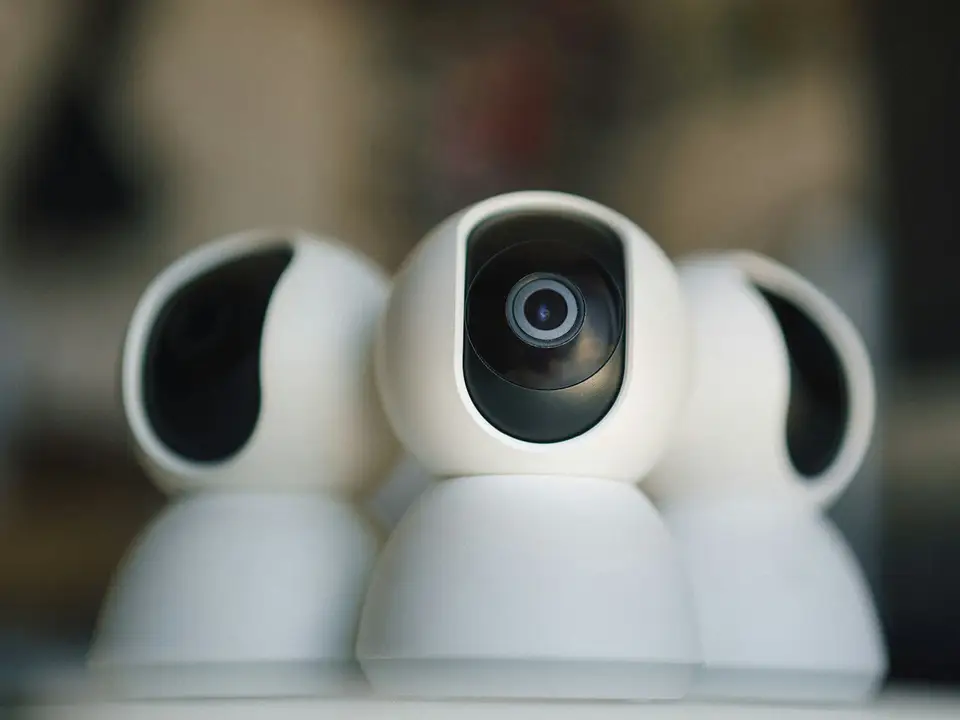
The four camera designs you'll see most often: bullet, dome, turret and PTZ.
What CCTV is and how a system works
CCTV stands for closed-circuit television: cameras that send video to a limited set of screens and recorders rather than to a public broadcast. A typical system has five parts:
Cameras capture the video.
Cables (or, less reliably, Wi-Fi) carry the video, and often the power, from each camera.
A recorder, an NVR or a DVR, saves the video to one or more hard drives.
A router and internet connection let authorised people watch from elsewhere. Recording does not depend on the internet.
A monitor or phone app shows live video and plays back recordings.
The interactive tutorial above walks through these parts in order and shows how video travels from a camera to your phone.
A typical IP CCTV system. The switch, recorder and router should stay powered during a power cut.
IP cameras vs analogue HD cameras
This is the first big choice, because it decides the cable and the recorder.
IP cameras are small network computers. Each one compresses its own video and sends it over a network cable to a network video recorder (NVR). Most are powered through the same cable using Power over Ethernet (PoE).
Analogue HD cameras, sold under the names HD-TVI, HD-CVI and AHD, send video over coaxial cable to a digital video recorder (DVR), which does the compression. They usually need a separate power cable, although some brands offer power over coax (PoC) cameras and recorders that carry power on the same coax.
Current analogue HD formats reach up to 4K (8 MP) on some models, so analogue is no longer limited to the grainy pictures of old CCTV. IP still offers the wider choice of resolutions, lenses and smart detection, and is easier to extend. For new buildings IP is usually the better choice; analogue HD can be a sensible budget upgrade where good coaxial cable is already in the walls. The full comparison is in IP CCTV vs analogue CCTV.
Discreet; the cover hides where the lens points; vandal-resistant versions are common
A dirty or scratched cover can reflect infrared and haze the night picture; re-aiming means opening the cover
Turret ("eyeball")
Entrances, walls, eaves, indoors or out
Easy to aim; no cover in front of the lens, so no cover glare at night
Lens is exposed, so less tamper-resistant than a vandal dome
PTZ (pan-tilt-zoom)
Large yards, hotel grounds, warehouses, school compounds
One camera can be moved and zoomed to follow activity
Costly; when it looks one way it misses the other; needs more power and an operator or presets
Bullet, dome and turret cameras compared. The design affects visibility, aiming and night-time glare.
Tip Most properties use a mix: bullets or turrets outside, domes inside, and a PTZ only where someone actually watches live. For the detailed comparison, read bullet vs dome cameras or try the bullet, dome or turret guide.
Outdoor cameras face sun, rain, dust and sometimes a thrown stone. Two international ratings, printed on every good datasheet, tell you how well a camera copes.
IP (ingress protection) rating, IEC 60529. The first digit is protection against solids and dust, the second against water. A first digit of 6 means dust-tight. A second digit of 6 means protected against powerful water jets; 7 means protected against temporary immersion (tested at about 1 metre for 30 minutes). The two water tests are different, so IP67 does not automatically include IP66. That is why many outdoor cameras state "IP66/IP67". For an exposed outdoor position, look for at least IP66.
IK (impact) rating, IEC 62262. IK08 means the housing survives a 5 joule impact and IK10 a 20 joule impact. Choose IK10 wherever people can reach the camera.
Warning Ratings apply to the camera only. A badly sealed cable joint or junction box can still let water in. Ask how every connection will be protected, especially near the sea.
Image quality: resolution, lens, night vision and WDR
Resolution is measured in megapixels (MP). 2 MP is 1920 × 1080 (1080p), 4 MP is usually 2560 × 1440, and 8 MP is 3840 × 2160 (4K). More pixels show more detail, but they also need more storage and network bandwidth. Our guide to how much CCTV storage you need shows the effect.
The lens decides what those pixels are spread over. A short focal length such as 2.8 mm gives a wide view of a room but shows faces small; a longer lens such as 6 mm or 8 mm sees less width but more detail further away. Varifocal lenses can be adjusted during installation, and motorised versions can be adjusted from the recorder. A wide 8 MP camera can show less detail on a face at the gate than a narrow 4 MP one.
Night vision comes in two main types:
Infrared (IR): LEDs give out light the eye cannot see, and the camera shows a black-and-white image. The IR range on the datasheet is measured in ideal conditions.
Full-colour night cameras: very sensitive sensors, often with a small white light, show colour at night, which helps describe clothes and vehicles. The white light can disturb neighbours or guests.
WDR (wide dynamic range) helps when a scene has bright and dark areas at once, such as a doorway with sun behind the people walking in. Without it, faces become dark silhouettes. Look for "true WDR" with a dB figure on the datasheet for entrance cameras.
Wired vs wireless cameras
Wired PoE: one network cable carries both power and video. Standard PoE (IEEE 802.3af) delivers up to 12.95 W at the camera, PoE+ (802.3at) up to 25.5 W, and the four-pair 802.3bt standard up to 51 W (Type 3) or 71.3 W (Type 4), which some PTZ and heated cameras need. A copper Ethernet run is limited to 100 metres. This is the most reliable option for most businesses. The PoE budget calculator checks that a switch can power all the cameras at once.
Wi-Fi cameras: easier to install, but each still needs power, and thick block walls, distance and busy networks cause dropped video.
Battery cameras: no cables, but they usually record only short motion clips and need recharging. Fine for a small home or a temporary spot, not for continuous business recording.
Recorders, hard drives, network and apps
NVR or DVR: stores the video and manages the cameras. Match the recorder to the cameras (IP to NVR, analogue to DVR, or a hybrid recorder that takes both) and allow spare channels for future cameras.
Surveillance hard drives: recorders write video around the clock. Drives built for this, such as Seagate SkyHawk or WD Purple, are rated for surveillance workloads. Ordinary desktop drives are a poor substitute.
Network equipment: a PoE switch, good cabling and a router. Larger sites keep cameras on their own network, separate from staff and guest Wi-Fi. Extrion's networking and cabling service covers this.
Mobile app: live view and playback on your phone. Set it up through the manufacturer's app or a VPN, never by opening router ports. See how to view CCTV on your phone safely.
How much storage you need depends on the number of cameras, their bitrate and how many days you keep. Try the CCTV storage calculator.
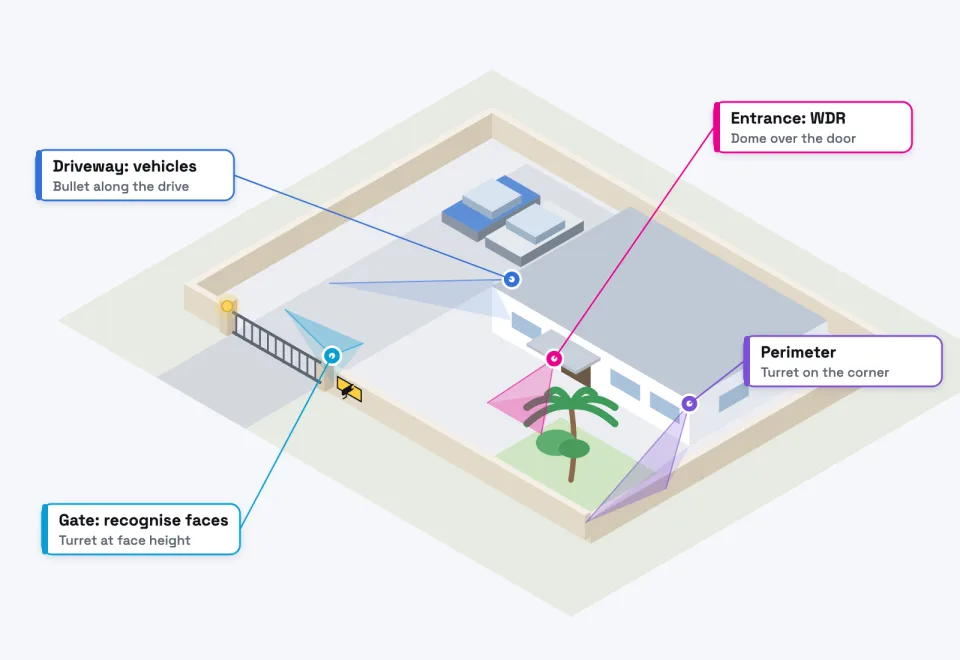
Example camera positions: cover entry points first, then routes and valuable areas.
Installation and purchasing considerations
Power cuts: a system that switches off during a power cut misses the moments that matter. Put the recorder, PoE switch and router on a UPS and ask how long it will last.
Coastal salt air: salt corrodes cheap brackets, screws and connectors. Ask for stainless fixings and sealed junction boxes.
Cable routes: run cables in conduit or trunking, out of reach, and not alongside mains cables for long distances.
Lighting: add outdoor lighting where faces must be identified at night.
Privacy and signage: Tanzania's Personal Data Protection Act, 2022 came into force on 1 May 2023, and organisations that collect personal data must register with the Personal Data Protection Commission. Video of identifiable people can be personal data. In 2024 the Commission warned that cameras in private places such as toilets are prohibited. Good practice includes visible signs, limiting who can view footage and avoiding views of neighbours' property. Seek legal advice for your situation.
Common mistakes
Buying on megapixels alone and ignoring lens, WDR and night performance.
Mounting cameras so high or so wide that faces cannot be recognised.
Pointing a camera straight at the sun or a bright doorway.
Using a desktop hard drive, or too little storage.
No UPS, so the system goes dark in a power cut.
Keeping the default password, or opening the recorder to the internet with port forwarding.
Cheap brackets that rust within months near the coast.
Nobody responsible for checking that the system still records.
Camera-selection checklist
I know what each camera must do: detect movement, recognise a person or read a number plate.
Outdoor cameras are at least IP66, and reachable ones IK10.
The lens suits the distance and width of each view.
Entrances have a camera with true WDR.
The night vision type (IR or full colour) suits each location.
Cameras and recorder match (IP and NVR, analogue and DVR, or hybrid).
Storage is calculated for the number of days I need.
The recorder, switch and router are on a UPS.
Privacy zones, signage and access to footage are agreed.
Questions to ask an installer before buying
Will you survey the site, including after dark, before quoting?
Which camera models, and can I see the datasheets?
How many days of recording will I get, and at what quality?
How will the cameras and recorder be powered during a power cut?
How will cables be run and protected outdoors?
How will remote viewing be set up securely, without port forwarding?
Who owns the admin password, and will you hand it over?
What training, warranty and after-sales support are included?
When to call Extrion
When you know what you want to protect, Extrion can survey the site, design the camera positions, cabling and backup power, and install and hand over the system with your own admin password. See our CCTV installation service, request a quote or contact us.
This guide is general information. Procedures, product features and firmware change, so check your own equipment's documentation before you start.
FAQs
Frequently asked questions
Is an IP camera always better than an analogue one?
Not always. IP is usually the better choice for new installations because of its wider choice of cameras and simpler PoE cabling. Analogue HD can be a sensible budget upgrade where good coaxial cable is already installed.
What is the difference between an NVR and a DVR?
An NVR records IP cameras that send already-compressed video over a network. A DVR records analogue cameras over coaxial cable and does the compression itself. Hybrid recorders accept both.
Are more megapixels always better?
No. Megapixels only help if the lens puts enough of them on the subject, and more pixels mean more storage. A well-chosen 4 MP camera with the right lens often beats a badly placed 8 MP one.
What IP rating does an outdoor camera need?
For a position exposed to rain, look for IP66 or better on the datasheet. IP67 covers temporary immersion, which is a different test, so many outdoor cameras state both.
Can I use Wi-Fi cameras for my business?
For one or two cameras close to the router, perhaps. For continuous, reliable recording across a business, wired PoE cameras are the safer choice.
Will my cameras work during a power cut?
Only if the cameras, recorder, switch and router are on a UPS or other backup power. With PoE, backing up the switch also backs up the cameras it powers.
How long should I keep recordings?
Long enough to notice and investigate an incident, often one week to one month. This is common practice, not a legal figure. The storage guide shows what that means in disk space.
Need Professional CCTV Installation?
Our engineers survey the site, choose the right cameras and recorder, install them neatly and set up safe remote viewing.
Ask for clarification, tell us a problem this did not solve, or suggest a topic. An engineer reads every message, and we use them to improve the Knowledge Center.
BookBook a consultationPick a time to talk through your project.
Call us+255 674 020223
WhatsAppChat with our team.
Emailinfo@extrion.co.tz
PayPay withBank and mobile money detailsPBZ Bank 045 195 9000Mixx by Yas +255 674 020 223Lipa Namba 16172192
Find usKiembesamaki, Zanzibar
Ask Extrion
Engineers reply Mon – Fri, 08:00 – 17:00
End this chat?
We'll send a copy of the conversation to our team. Next time, the chat starts fresh.
online nowPeople browsing Extrion Tech right now
Privacy by design
A few cookies, only with your say-so
We use essential cookies to keep this website secure and working. With your permission we also remember your preferences and play embedded videos. No advertising trackers, ever. Read our cookie notice




 CCTV, Surveillance & Physical Security
30 min